Loops and Control Structures in Python

🌟 Background & Passion:
With a background in Data Science and Natural Language Processing, I've always been fascinated by the power of programming to solve real-world problems. My journey into the world of Python began in college days when I first took a course in Python. Ever since, I've been passionately exploring the endless possibilities that Python offers.
🔍 What I Do:
By day, I'm a freelance Data Scientist. By night, I turn into a Python explorer, delving into new libraries, and frameworks, and constantly updating my blog to share my learnings and experiences.
✍️ My Blog's Mission:
Code and Query is more than just a blog; it's a platform where I aim to simplify Python programming and Data Science/Machine Learning concepts for beginners and enthusiasts alike. From basic concepts to advanced techniques, I strive to make my posts as clear, comprehensive, and engaging as possible. My goal is to help you not just understand data, but also appreciate its elegance and efficiency and derive trends and insights.
🌐 Beyond Python:
When I'm not coding or writing, you'll find me writing poetries or reading philosophy. I believe in a balanced life, where passions outside of work fuel creativity and new ideas within my professional sphere.
💬 Let's Connect:
I love connecting with fellow Python enthusiasts and tech lovers. Feel free to reach out to me on kritishapanda75@gmail.com or other social media handles on my profile. Whether it’s feedback, ideas, or just a chat about technology, I'm all ears!
Welcome to our comprehensive guide on loops and control structures in Python. These are fundamental aspects of programming in Python, allowing for efficient repetition of code and control over the execution flow. Let's dive in!
Loops in Python
Loops are a cornerstone of programming in Python, enabling you to execute a block of code repeatedly. Python primarily uses two types of loops: for loops and while loops.
For Loops
Here is how you can understand a for loop better:

Pros:
Ideal for iterating over sequences (like lists, strings, or tuples).
Count-controlled: the number of iterations is determined at the start.
Less risk of creating an infinite loop compared to while loops.
Cons:
- Less flexible when the number of iterations is not known in advance.
Best Use Case: Iterating over elements of a collection (e.g., processing items in a list).
Example:
for i in range(5):
    print(i)
While Loops
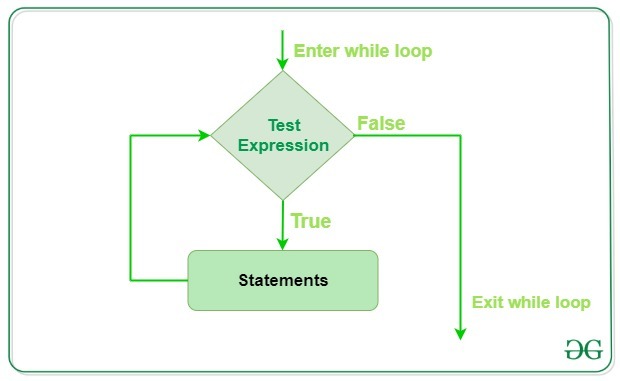
Let's see what a while loop looks like:
Pros:
Condition-controlled: runs as long as a condition is true.
More flexible, suitable for situations where the number of iterations isn’t predetermined.
Cons:
Higher risk of unintentionally creating infinite loops.
Can be less intuitive when working with collections.
Best Use Case: Repeating an action until a certain condition changes (e.g., user input, file processing until end-of-file).
Example:
count = 0
while count < 5:
    print(count)
    count += 1
Control Statements - Continue, Break, and Pass
Control statements like continue, break, and pass alter the execution of loops in Python.
Continue Statement
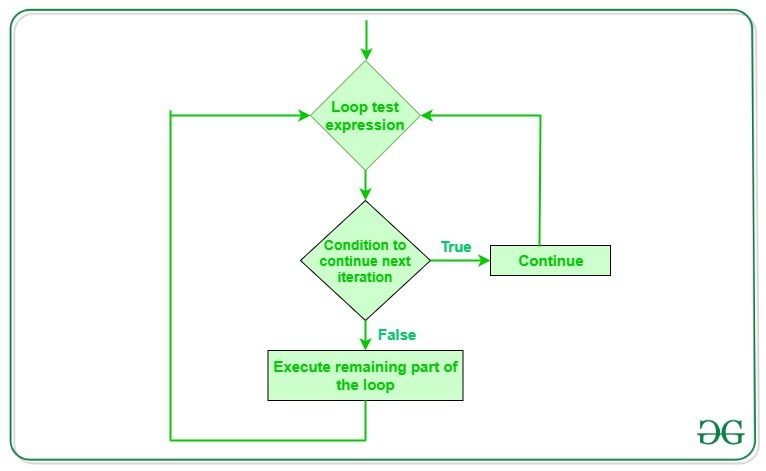
Use Case: Skips the rest of the code inside a loop for the current iteration only. Loop does not terminate but continues with the next iteration.
Flow Chart:
Example:
for num in range(5):
    if num == 3:
        continue
    print(num)
Break Statement
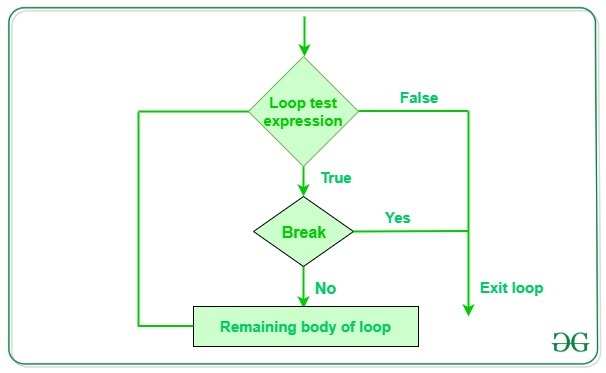
Use Case: Exits the loop entirely. Used to stop the execution of the loop when a certain condition is met.
Flow Chart:
Example:
for num in range(5):
    if num == 3:
        break
    print(num)
Pass Statement
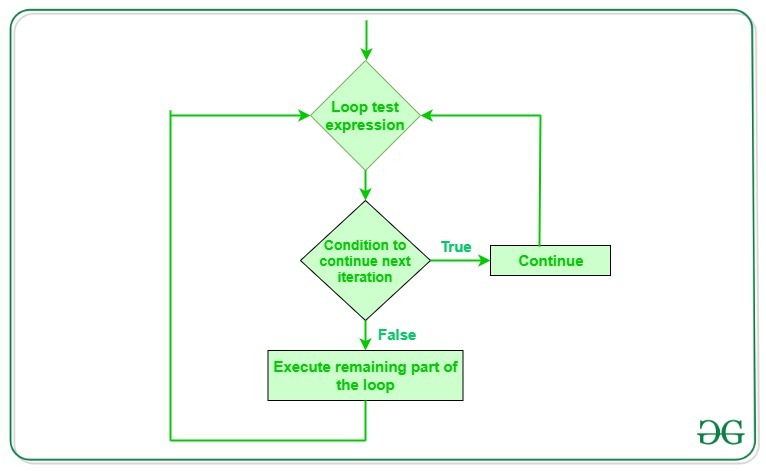
Use Case: A null statement. It's a placeholder in situations where a statement is syntactically required but no action is needed.
Flow Chart:
Example:
for num in range(5):
    if num == 3:
        pass
    print(num)
Conclusion
Understanding loops and control structures is essential for effective Python programming. Whether it's iterating over data, repeating tasks until a condition is met, or controlling the flow of execution, these structures are powerful tools in your coding toolkit. Remember, the key to mastering them lies in practice and application in real-world scenarios.
You can refer to this video tutorial for better clarity:
This blog post provides a detailed overview of loops and control structures in Python, complete with examples and scenarios for their use. Keep practicing, try to understand control structures intuitively. That'll help in the long run. Till then...

